Thursday, 24 October 2013

SQL Server Inetrview FAQ 3

1.       How to find the maximum no of connection allowed in SQL Server?

 Select @@MAX_Connections

2.       How to select top 2 rows without using top?

 It can be achieved by using rowcount. For example
SET ROWCOUNT 2
SELECT *from tblName

3.       What is the purpose of SET ANSI NULLS ON?

SET ANSI NULLS ON is used to follow ANSI standerds.So if you are working with distibuted queries running across multiple server,You need to SET ANSI NULLS ON,to maintain compatibility for all servers.
For example: We should not use <> or != for checking NULL condition,It should be is NULL or is NOT NULL as per ANSI standerds.

4.       How to insert Multiple Rows in single query?

We can use Row Constructor as an example
INSERT INTO TABLENAME(COL1,COL2,COL3)
VALUES
('VAL1','VAL2','VAL3'),
('VAL11','VAL22','VAL33'),
('VAL111','VAL222','VAL333')

5.       Which type of column we can’t update using UPDATE?

TIMESTAMP type of column can’t be updated.

6.       How can you apply restrictions on database objects?

We can create constraints, triggers or rules and defaults to apply restrictions. Constraints are better than triggers and rules. Triggers and rules should only be used if constraints are not an option because triggers make overhead on system.

7.       CAST vs. Convert

Convert does everything that CAST does. The only difference is that CAST is ANSI/ISO compliant while CONVERT is not.

8.       What is the default port no of SQL server

SQL Server listen TCP port 1433 by default.

9.       What are DMVs?

DMV: Dynamic Management Views are used to monitor server state information as health of server instance, performance, connections.
For example:
SELECT * FROM sys.dm_os_wait_stats;
It will return operating system wait states.
SELECT * FROM sys.dm_exec_sessions;
It will return cureent sessions. Some other DMVs are
·         dm_broker_connections
·         dm_broker_forwarded_messages
·         dm_broker_queue_monitors
·         dm_cdc_errors
·         dm_cdc_log_scan_sessions
·         dm_clr_appdomains
·         dm_clr_loaded_assemblies
·         dm_clr_properties
·         dm_clr_tasks

10.   OLTP vs OLAP

OLTP: Online Transaction Processing (It is used for usual applications).Most of applications are OLTP based. It emphasizes on Update.

OLAP: (Online Analytic Processing)It is used for multidimensional queries and better approach for MIS and decision making systems. In Business Intelligence OLAP used. It emphasizes on Retrieval.

Saturday, 19 October 2013

Cumulative SUM in SQL Server


Sometimes we need to find sum of first and next row in cumulative way.

Create table and insert data:

CREATE TABLE [dbo].[testsum](
      [name] [varchar](10) NULL,
      [val] [int] NULL,
      [ID] [int] NULL
) ON [PRIMARY]

insert into [testsum] (id,name,val)
values(1,'A',10),
(2,'B',20),
(3,'C',30)

Required Output:
ID    name  val   cumSum
1     A     10    10
2     B     20    30
3     C     30    60

To find cumulative sum first you need to self join on condition >=

select t1.*,t2.* from testsum t1 inner join testsum t2 on t1.ID>=t2.ID

output after join.
t1
t2
ID
name
val
ID
name
val
1
A
10
1
A
10
2
B
20
1
A
10
3
C
30
1
A
10
2
B
20
2
B
20
3
C
30
2
B
20
3
C
30
3
C
30

Group by ID and SUM.

select t1.id, t1.val, SUM(t2.val) as cumSum
from testsum t1
inner join testsum t2 on t1.id >= t2.id
group by t1.id, t1.val
order by t1.id

t1
t2
ID
name
val
ID
name
val
1
A
10
1
A
10
2
B
20
1
A
10
3
C
30
1
A
10
2
B
20
2
B
20
3
C
30
2
B
20
3
C
30
3
C
30

We reach to output:

id
val
cumSum
1
10
10
2
20
30
3
30
60


Thursday, 19 September 2013

How to Split a string by delimited char in SQL Server..............

However I posted this one in one of my post.
Querying Microsoft SQL Server : Functions in SQL Server: Functions in SQL Server In SQL Server functions are subrotienes that encapsulate a group of T-SQL statements for reuse.SQL Server pro...

Here I separate ,Split function from that post.

CREATE FUNCTION [dbo].[fnSplitString] 
( 
    @string NVARCHAR(MAX), 
    @delimiter CHAR(1) 
) 
RETURNS @output TABLE(splitdata NVARCHAR(MAX) 
) 
BEGIN 
    DECLARE @start INT, @end INT 
    SELECT @start = 1, @end = CHARINDEX(@delimiter, @string) 
    WHILE @start < LEN(@string) + 1 BEGIN 
        IF @end = 0  
            SET @end = LEN(@string) + 1
       
        INSERT INTO @output (splitdata)  
        VALUES(SUBSTRING(@string, @start, @end - @start)) 
        SET @start = @end + 1 
        SET @end = CHARINDEX(@delimiter, @string, @start)
        
    END 
    RETURN 
END


Exceute this T-sql statements to create function and use as

select *from dbo.fnSplitString('Querying SQL Server','')

Output:

Friday, 13 September 2013

Connection Pool limit exceeds Error

Sometimes below error occurs on our web applications hosted on IIS connected with SQL Server.

Timeout expired.  The timeout period elapsed prior to obtaining a connection from the pool.  This may have occurred because all pooled connections were in use and max pool size was reached.

Description: An unhandled exception occurred during the execution of the current web request. Please review the stack trace for more information about the error and where it originated in the code.


Exception Details: System.InvalidOperationException: Timeout expired.  The timeout period elapsed prior to obtaining a connection from the pool.  This may have occurred because all pooled connections were in use and max pool size was reached.


Basically, This error occurs whenever connection pool limit exceeds.This can be resolved by clearing connection pool.However this can be resolved using SQL Server by number of ways.
You can use

SqlConnection.ClearAllPools(); of .Net to clear pool.


SqlConnection.ClearAllPools() method empties the connection pool.If there are connections in use at the time of the call, they are marked appropriately and will be discarded (instead of being returned to the pool) when Close method  is called on them.


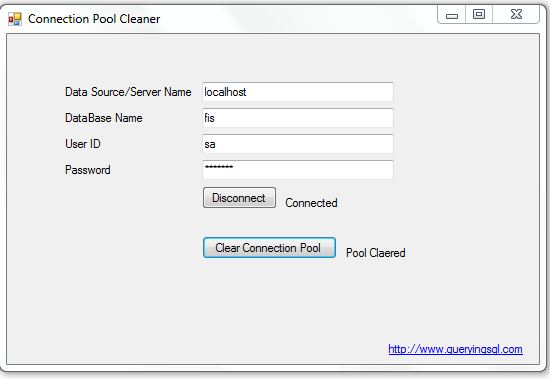
Sometimes you need to clear pool without modifying your code.So I create a utility for cleaning connection pool.A simple window form that make a connection to your database and empty database connection pool.


Use Code:

private void button1_Click(object sender, EventArgs e)
     {
         try
         {
             //Creating Connection
             SqlConnection con = new SqlConnection();
             //Connection Sring
con.ConnectionString = string.Format("Data Source={0};Initial Catalog={1};Persist Security Info=True;User ID={2};Password={3}", txtData.Text, txtDatabaseName.Text, txtUserID.Text, txtpassword.Text);
             if (button1.Text == "Connect")
                {
                 //Open Connection
                 con.Open();
                 if (con.State == ConnectionState.Executing)
                 {
                     lblStatus.Text = "Connecting..........";
                 }
                 else if (con.State == ConnectionState.Open)
                 {
                     lblStatus.Text = "Connected";
                     button1.Text = "Disconnect";
                     btnClear.Enabled = true;
                 }
             }
             else
             {
                 con.Close();
                 lblStatus.Text = "Disconnected";
                 button1.Text = "Connect";
                 btnClear.Enabled = false;
             }
         }
         catch (Exception ex)
         {
             lblStatus.Text = ex.ToString();
         }
     }
 
     private void btnClear_Click(object sender, EventArgs e)
     {
         //Clear all Pools.
         SqlConnection.ClearAllPools();
         lblstatuspool.Text = "Pool Claered";
     }


Download Utility


Sourceforge:


Direct Link:


Wednesday, 11 September 2013

Insert data from Excel to SQL Server

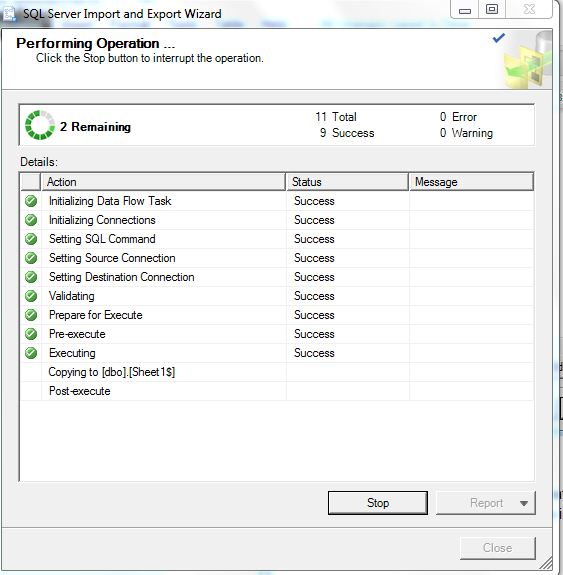
Here I am discussing about data insertion from MS Excel into SQL Server table. SSMS provides  Export Import wizard by which you can achieve same easily. Follow below steps
Suppose I have a Excel file on server as c:/fis.xlsx.

1.       Go to database
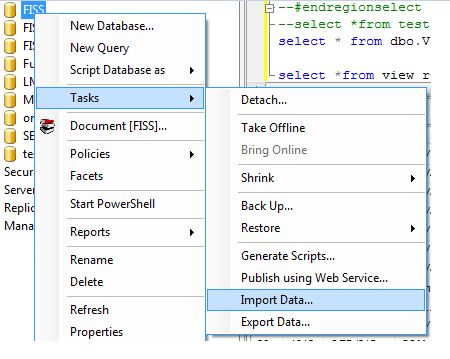
2.       Right Click on database select tasks
3.       Select Import Data


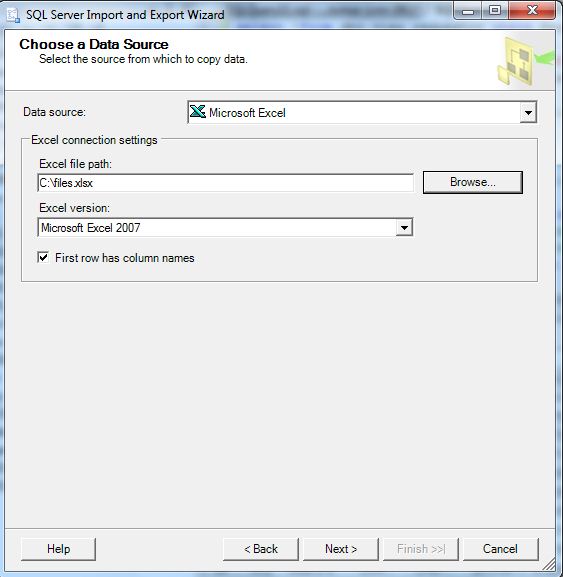
  1. A SQL Server Export Import wizard appears.Click Next.

  2. Choose DataSource Microsoft Excel from the List and Browse the Excel File


  1. Click Next.

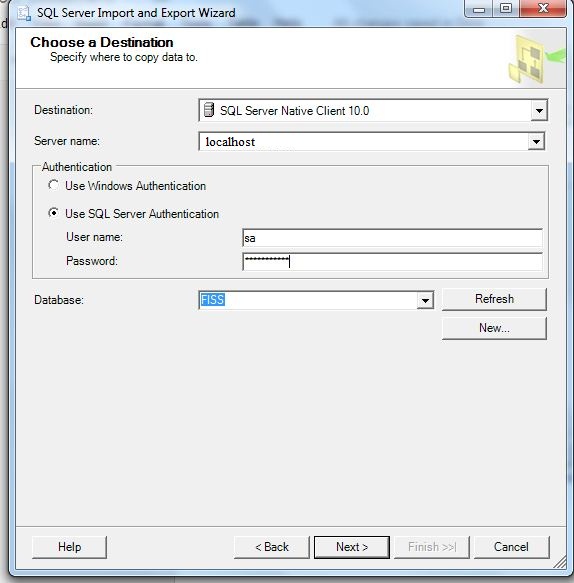
  2. Choose destination.


  1. Click Next


  2. Next


  1. Click Next->Next and Finish.


  2. Finally a new table named Sheet1$ created.

  3. Now if you want to insert these records in existing table,you can use simple insert statement and drop table.

--Sample
insert into dbo.existingtable(col1,col2,col3) values
(select col1,col2,col3 from dbo.Sheet1$)


Example:
insert into dbo.FileRecord(FileNo,ProjectName,Customer_Name,PropertyCode,Status,IDate,InsertedBy,UpdateDate,UpdatedBy,remarks,location)
select top 2 [FileNo,ProjectName,Customer_Name,PropertyCode,Status,IDate,InsertedBy,UpdateDate,UpdatedBy,remarks,location from dbo.Sheet1$


  1. Your data now successfully inserted into SQL Server table from Excel.

  2. You can drop the table.

  3. drop table dbo.Sheet1$